One log for twenty operators — a platform for amateur radio awards
The idea for this platform is mine; I laid down the architecture back in 2025 and wrote it myself.
On 6 March 2026 I showed it running for the first time — from my own laptop, through ngrok, with a link that lived until midnight. Even then it kept a shared log, accepted contacts from WSJT-X over UDP, imported ADIF with duplicate checking, and had separate dashboards for hunters and for organisers. The next evening the bridge for digital modes appeared — for Windows, Linux and macOS.
In April, seven weeks after that demonstration, the special callsign EN40CNP was on the air for the 40th anniversary of Chornobyl. Two weeks, 1565 contacts, several operators — and the whole log was merged by hand: the platform was not yet ready for real use. Vitalii, UT0UI, put the experience most precisely: “merging logs after the fact by hand is a right pain”.
By August it was ready. What follows is what came of it: the platform uahamaward.com, on which the “35th anniversary of Ukraine's independence” award made 17,387 contacts in 31 days, and not one of them was merged by hand — neither during the month nor after it.
The problem first
Everyone keeps their own log. Then it all gets merged into one file. Then it turns out two people were working the same band and mode at the same time. Then somebody has lost their ADIF. Then LoTW refuses the duplicates.
At 1565 contacts that is a few evenings. At seventeen thousand it is no longer work but an impossibility.
Four requirements
For the August activity I set myself not the task of “building a site” but four specific pains to remove.
- Two people must not land on the same band and mode at once. Somebody has to see who is on the air and where — and see it now, not afterwards.
- The log must be shared and live. Not a file at the end of the month but a table everyone sees in the same second.
- The certificate must count itself. Conditions, points, number, PDF — with no human in the loop.
- The ADIF that comes out must be accepted by LoTW and QRZ without edits. Not “almost the right format” but one that goes in first time.
What the platform does
This is not a site with a table. It is several separate programs that work together — and each can be used on its own.
A shared log: everyone sees the same thing, now
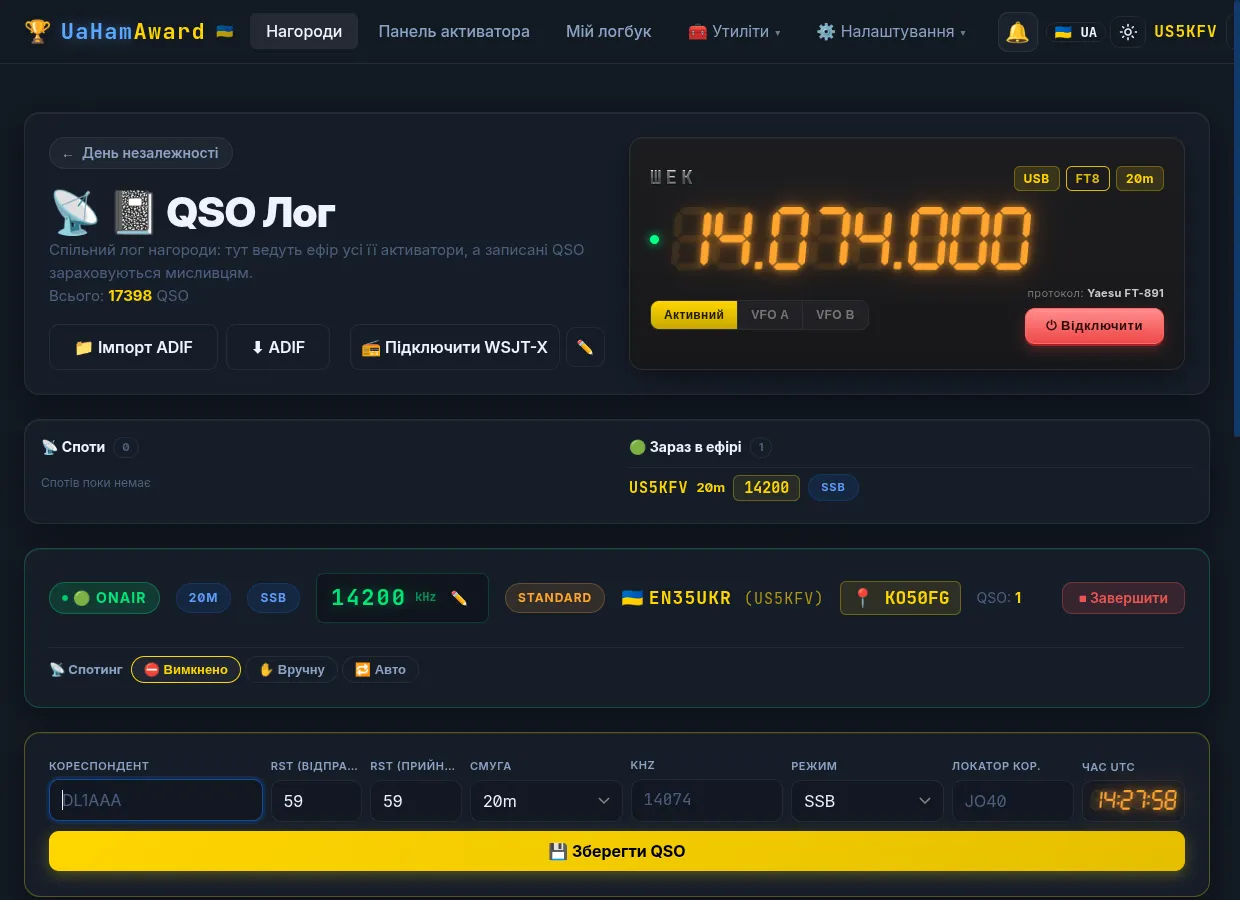
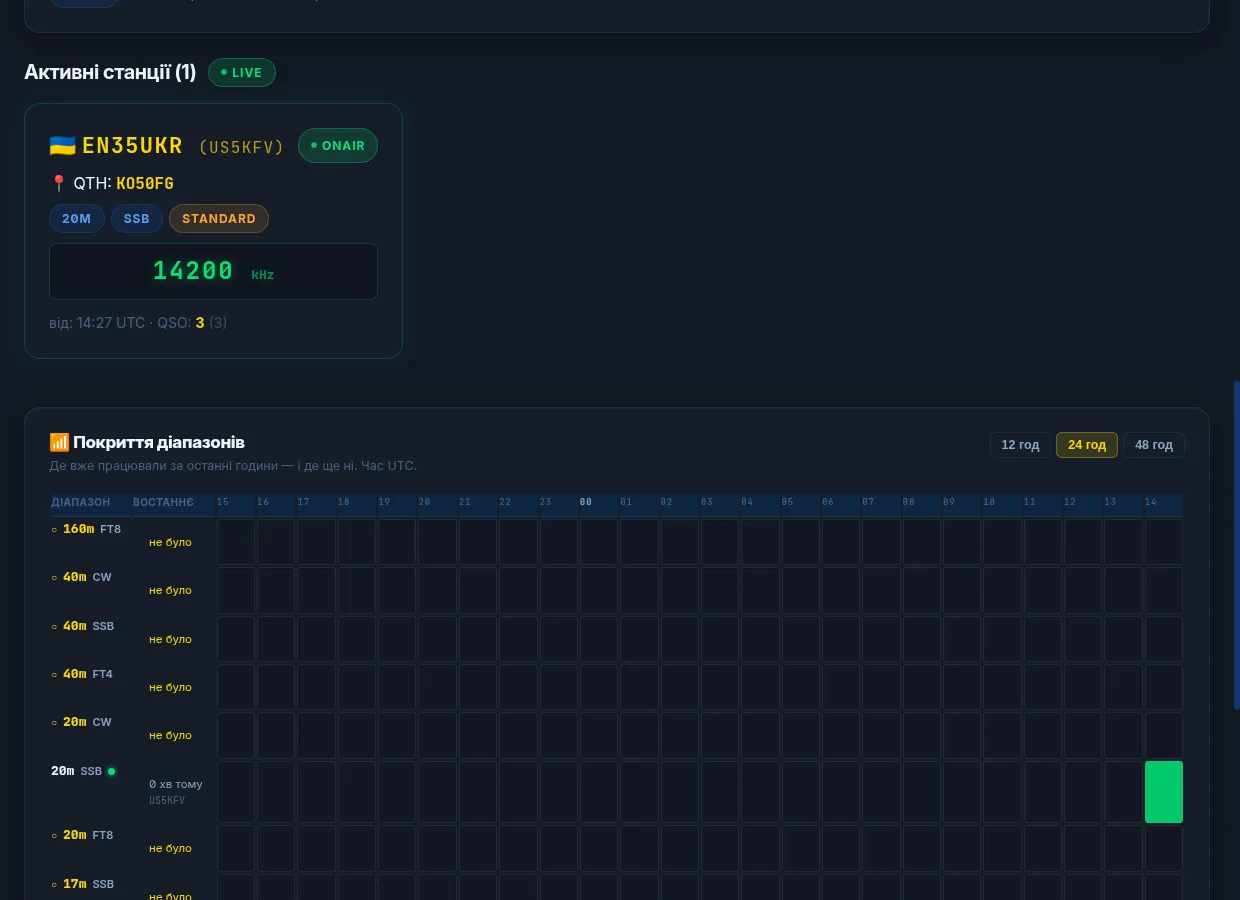
An operator opens the activator panel, presses “go on the air”, picks a band and a mode — and that slot is taken. The rest of the team sees it instantly, with no page reload: who is sitting where, on what frequency, in what mode.
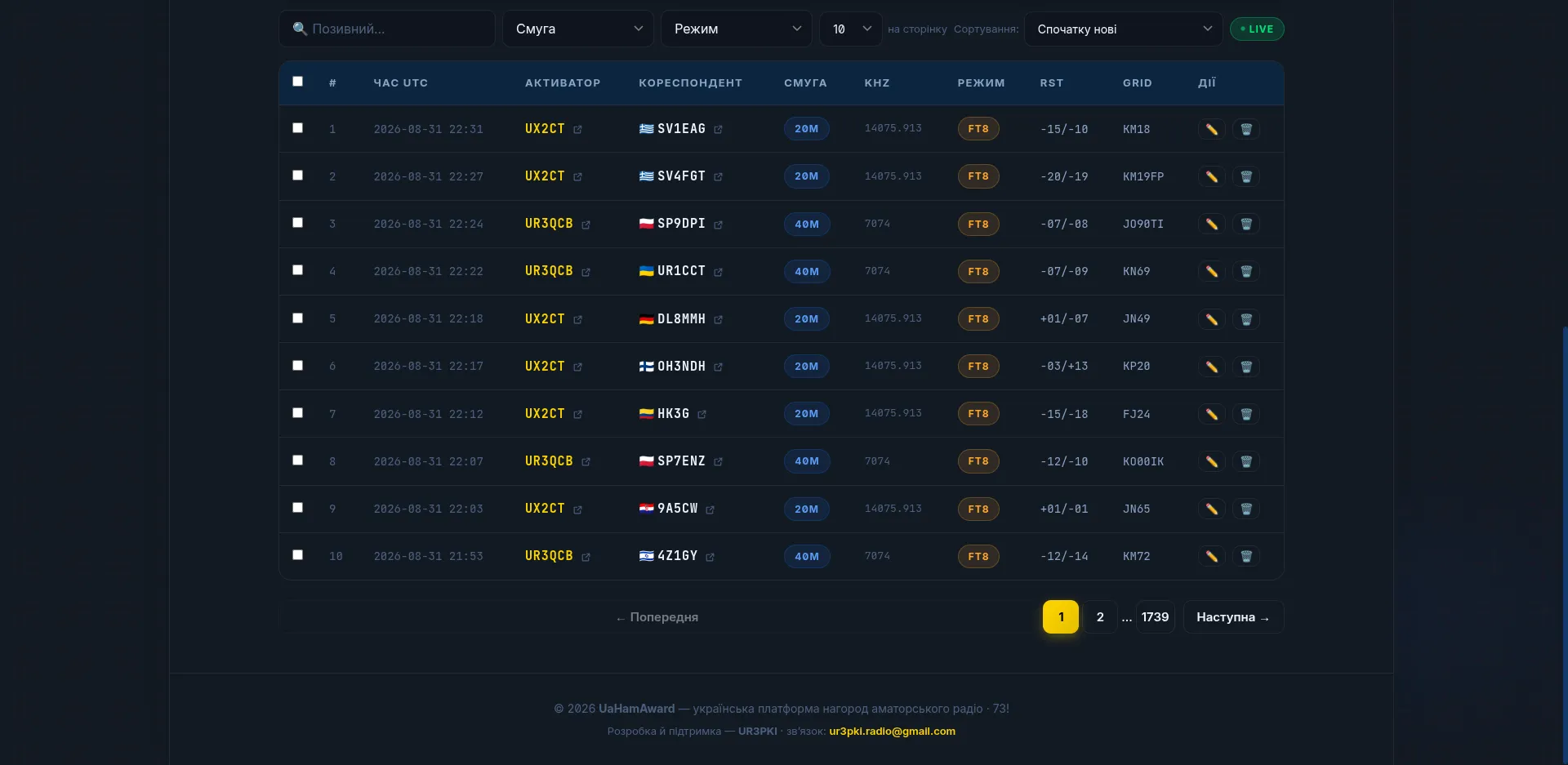
- Every contact appears in the shared log within a second.
- Duplicates do not get through. The same correspondent, band, mode and minute will not be written twice — even if two tabs send them simultaneously. That is not rare: one program sends to two tabs, and both try to write.
- A session someone forgot to close shuts itself after an hour without contacts, so a band is not held by somebody who simply closed their laptop.
- A mistake in the log can be corrected or deleted; the edits are visible to everyone.
- The event page and the hunter page are public, with no registration: anyone can watch the activity and their own progress.
CAT: the radio straight from the browser
Connect the radio over a COM port and the site fills the frequency and mode into the contact form by itself. Nothing has to be installed: it works in the browser.
- Frequency and mode are read from the radio rather than typed.
- VFO and band control from the same page.
- 172 models out of the box: Icom, Yaesu, Kenwood, Elecraft, Ten-Tec, Xiegu, FlexRadio, Alinco, JRC, AOR, Elad, Expert Electronics. The profiles come from the OmniRig format, so a radio not on the list is added with a description file rather than by rewriting code.
- If you do not need CAT, just pick the band and mode by hand; everything else works the same.
The bridge: WSJT-X writes to the log by itself
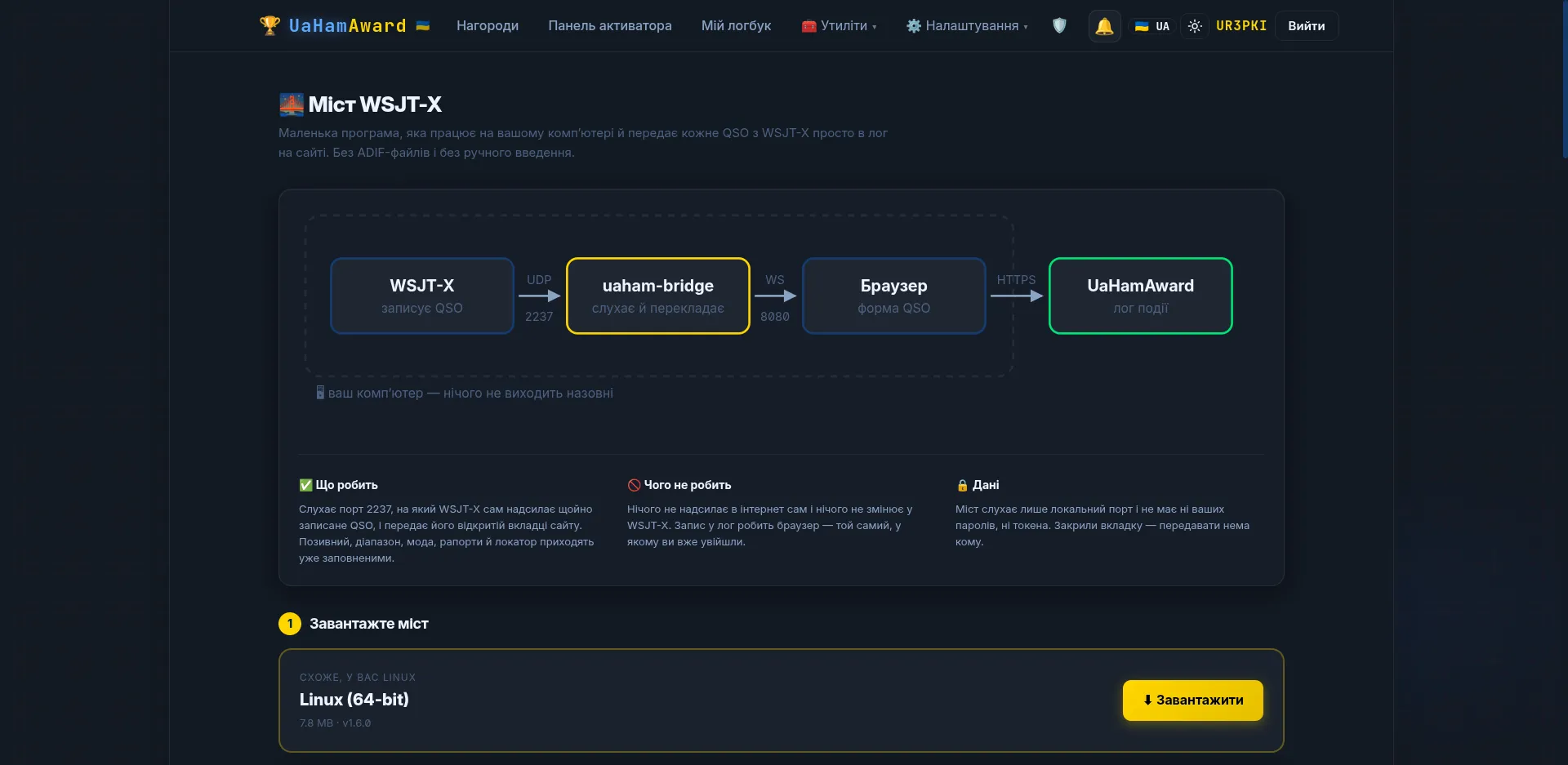
A small program on your computer: it catches packets from WSJT-X and puts the contact straight into the award log. Make a QSO and it is already in the shared table, where the rest of the team can see it.
- Seven builds: Windows, Linux, macOS (x86 and ARM) — downloaded from the page and started with a double click.
- It updates itself, but only when you press the button: the bridge holds the port WSJT-X knows about, and an unexpected restart in the middle of an activation means lost contacts.
- Settings in a browser window, not on a command line.
- It forwards the packets on, so JTAlert, GridTracker or N1MM work alongside it. WSJT-X can only send to one address, which is why you previously had to choose just one.
Custom builds of WSJT-X and WSJT-Z with a country filter
Two builds of the popular digital-mode programs, with what the originals lack.
- A country filter at the decoder level. You pick countries from the DXCC list: hidden stations do not appear in any window, and the program will not answer them even on a direct call. Unlike the existing filters it works by country rather than by text match — “Japan only” catches every prefix at once.
- A direct link to the platform. Log a QSO and it is on the award page immediately. No separate bridge needed.
- A Ukrainian interface: menus, settings, tooltips, errors. Mode and band names stayed in English — that is what people are used to.
- Callsign data from QRZ.com right in the program window.
- Along the way a bug in the inherited code was fixed: filtering out one signal made every subsequent signal in the same period disappear.
Spotting: announcements to the DX cluster
From the log page, in two clicks — or automatically while you work.
- Manual spots and an automatic mode with a timer.
- The timer knows the node's rules, so you will not be refused for repeating. And it knows that after a frequency change you may spot immediately.
- A spot feed on the log page: other people's and your own, with the author's callsign.
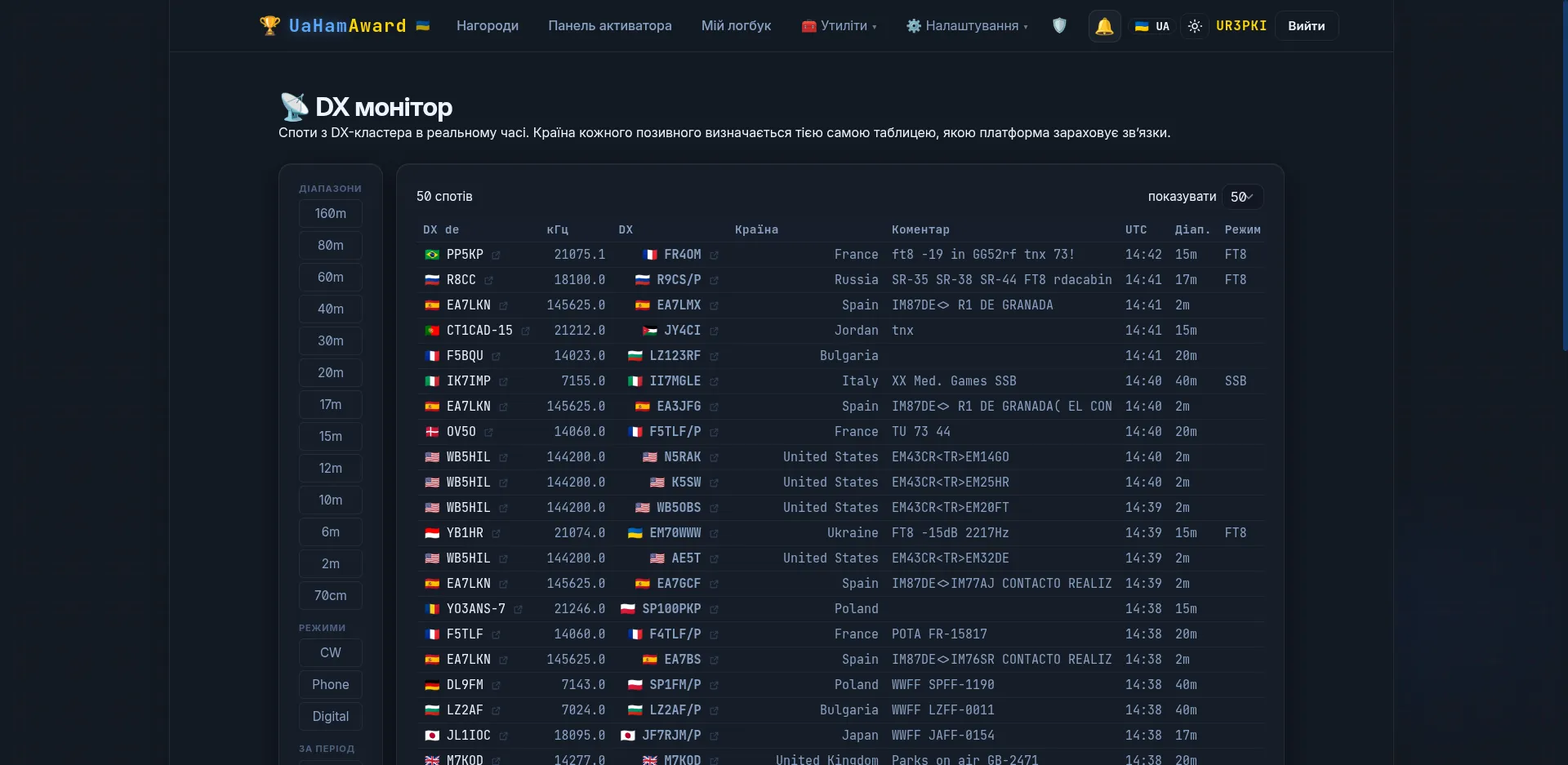
- A cluster monitor of our own — like dxheat, but ours.
Certificates: counted, numbered and assembled automatically
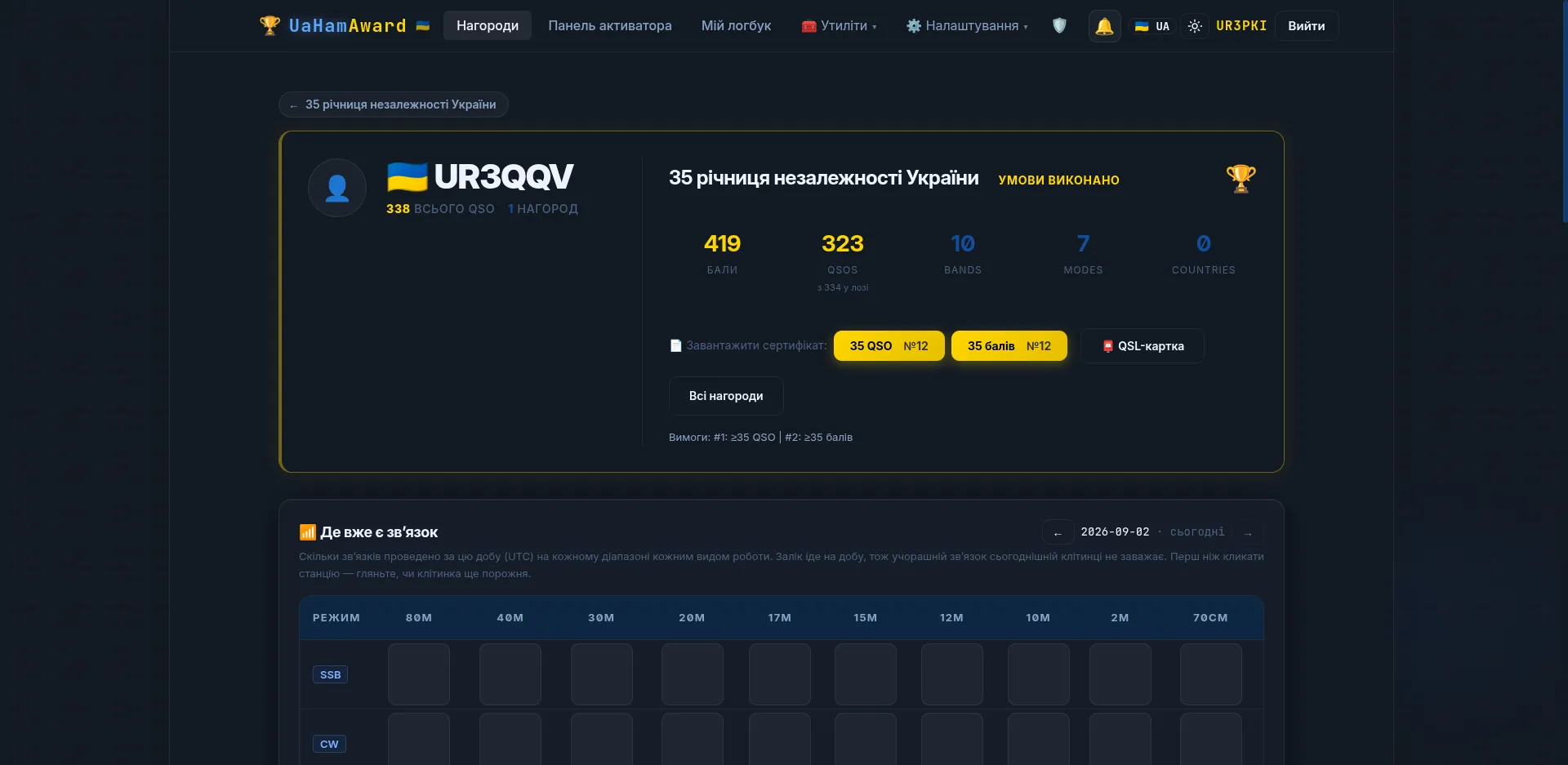
The organiser describes the conditions in the award settings, and the platform does the rest.
- Conditions: a minimum number of contacts or points, separate conditions per mode and band, several groups of conditions at once.
- Special days. A multiplier can be assigned to particular dates — for us those were 23 and 24 August. The multiplier applies to the score rather than to a log line, so the holiday rewards three bands rather than three hundred calls on one.
- The certificate number is your place in the log. The queue is worked out from contact dates, not from who pressed “download” first. And every condition has its own numbering.
- The PDF is generated in two languages — whichever one the hunter opened the site in.
- An ADIF that arrives a week later takes the place in the queue its dates have earned: the roll is recomputed from the log.
QSL cards — electronic and for printing
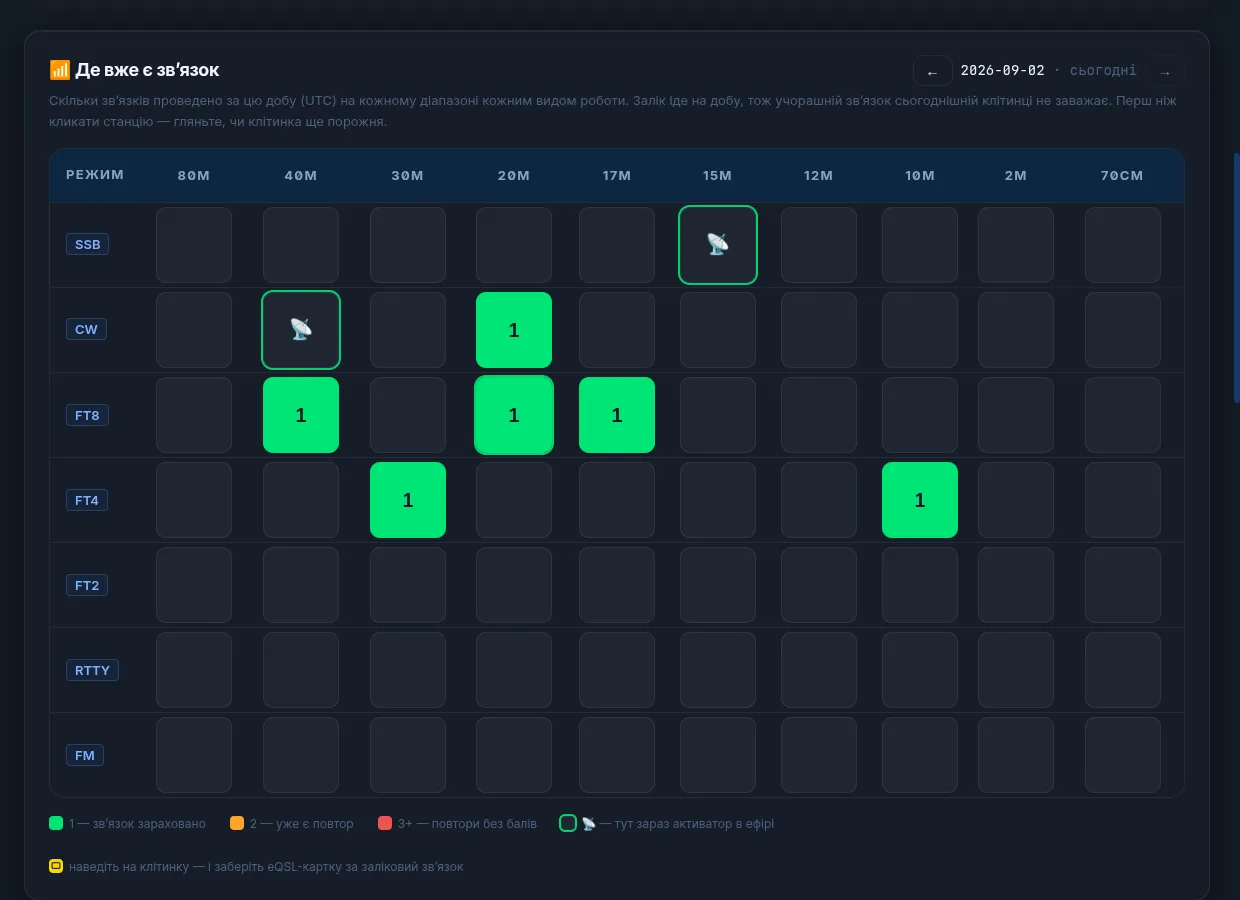
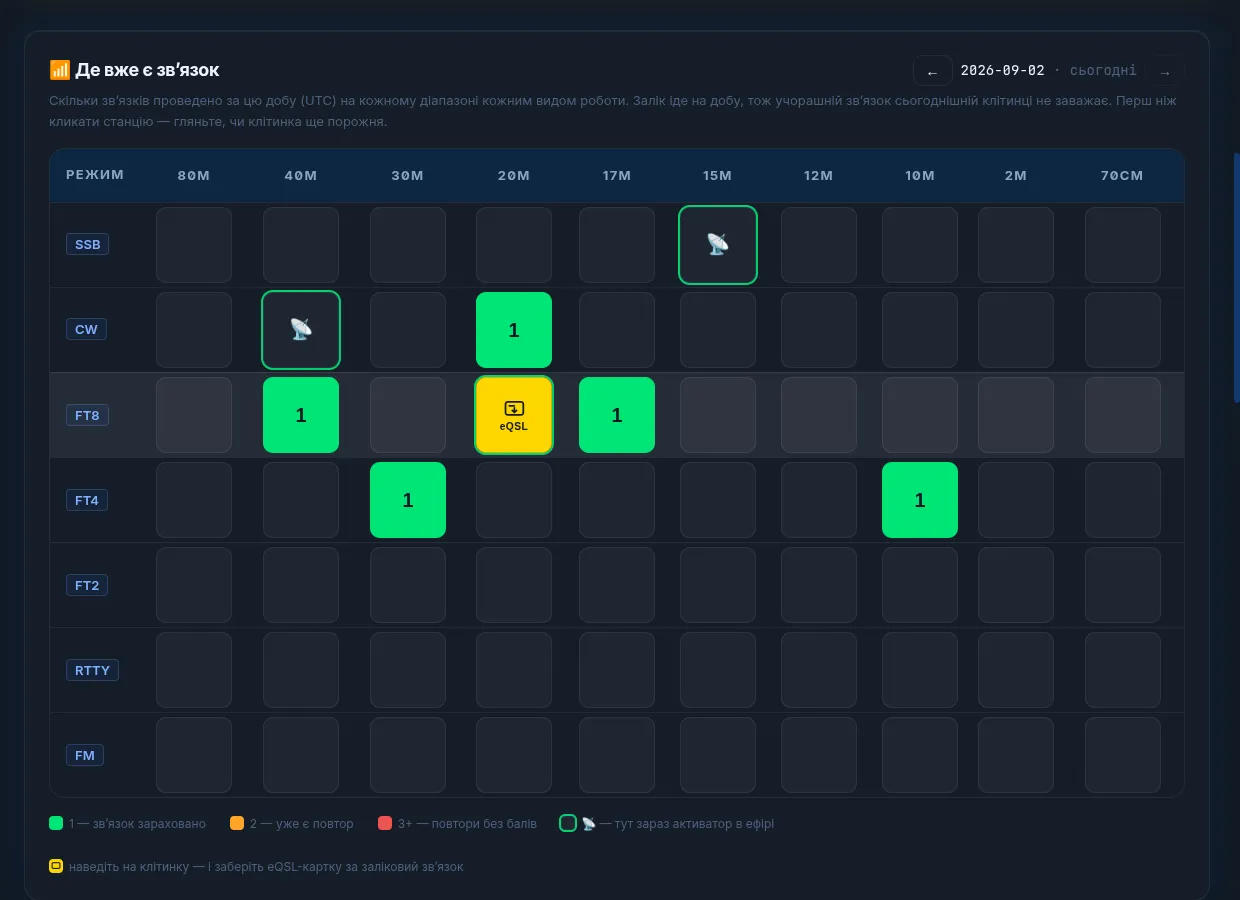
- An electronic QSL for each contact individually: the hunter opens their page, hovers over a “band × mode” cell, and downloads the card for exactly that contact.
- A 140 × 90 mm layout for printing, if paper cards are being ordered.
- Nothing has to be written out by hand — in August that produced 62 certificates and all the cards.
ADIF: import, export, and what LoTW accepts
- Import of files up to 20,000 records with a progress bar — a full month's log goes in within 15–20 seconds.
- An export that QRZ.com and LoTW accept without edits: the right format version and correct submodes (ADIF does not know “FT4” as a mode — it is a submode of MFSK, and that is how it gets written).
- Frequency is in kilohertz everywhere — in the form, in the session, in the bridge. On output it is converted as it should be, so a contact does not end up 430 Hz away from where the other station logged it.
- A daily copy of the whole log emailed to the organisers — from once to eight times a day.
QRZ.com: contacts upload themselves
If you have an XML Logbook Data subscription on QRZ, paste your logbook key into the settings and there is nothing more to do. The platform uploads every contact you make to your QRZ logbook by itself. No exports, no uploading ADIFs by hand.
- It works in two places: your personal log goes to your logbook, and the award log to the award's logbook.
- They are deliberately not the same: a QRZ logbook belongs to one callsign, and contacts made under an event callsign simply will not be accepted into your own. So the award has a key of its own.
- The state of each contact is visible separately: sent, duplicate, error — and exactly what QRZ replied if it did not go through.
- Contacts made before you pasted the key can be sent retrospectively.
- The key is stored encrypted and never shown back — the interface shows the last four characters.
- From the other side, QRZ is a directory: empty locators in the log are filled in automatically. Only the empty ones: a locator given on the air is worth more than a guess about where a station usually operates. Portable callsigns are skipped, because QRZ would return the home square and the contact was not made from there.
Statistics: what is visible about the event in real time
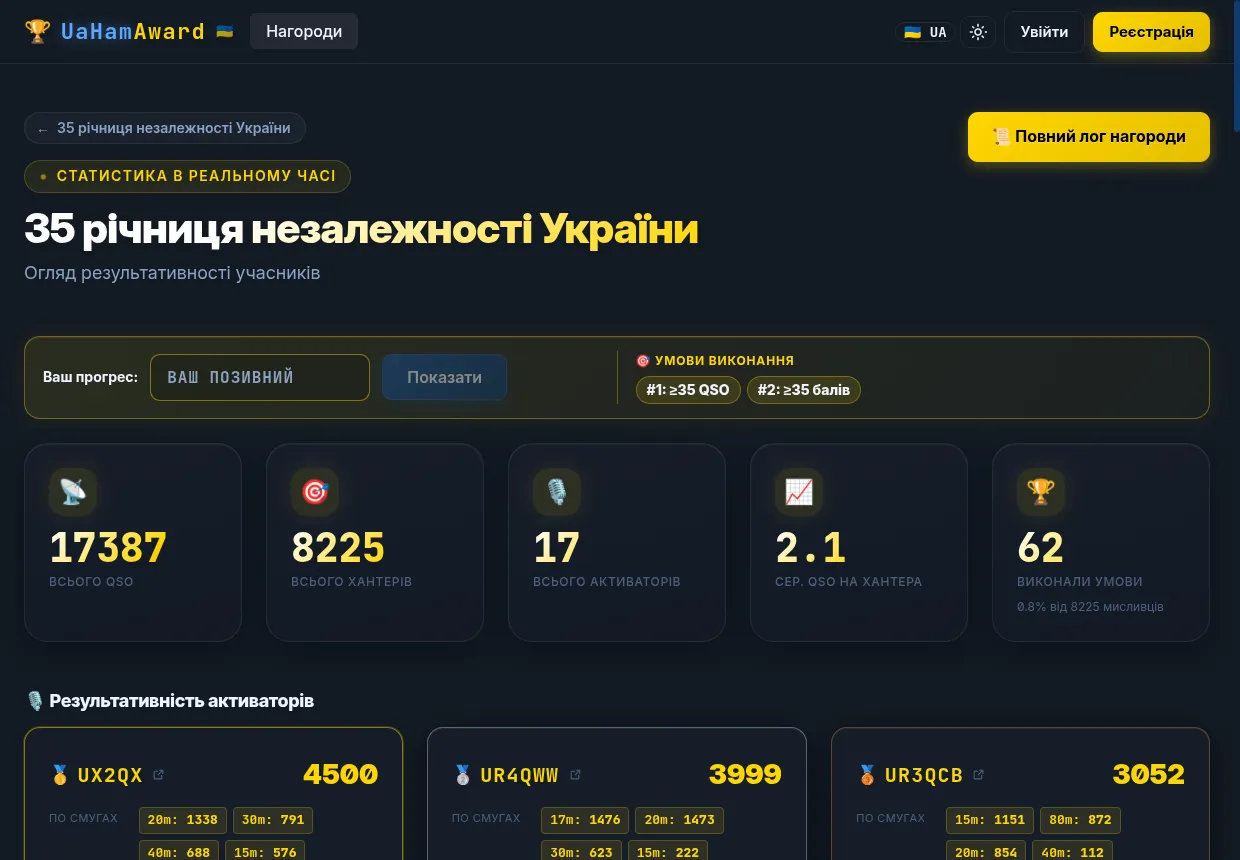
- Each activator's output: how many contacts, on which bands, in which modes.
- Band coverage by hour — you can see where work has been done and where you are still awaited.
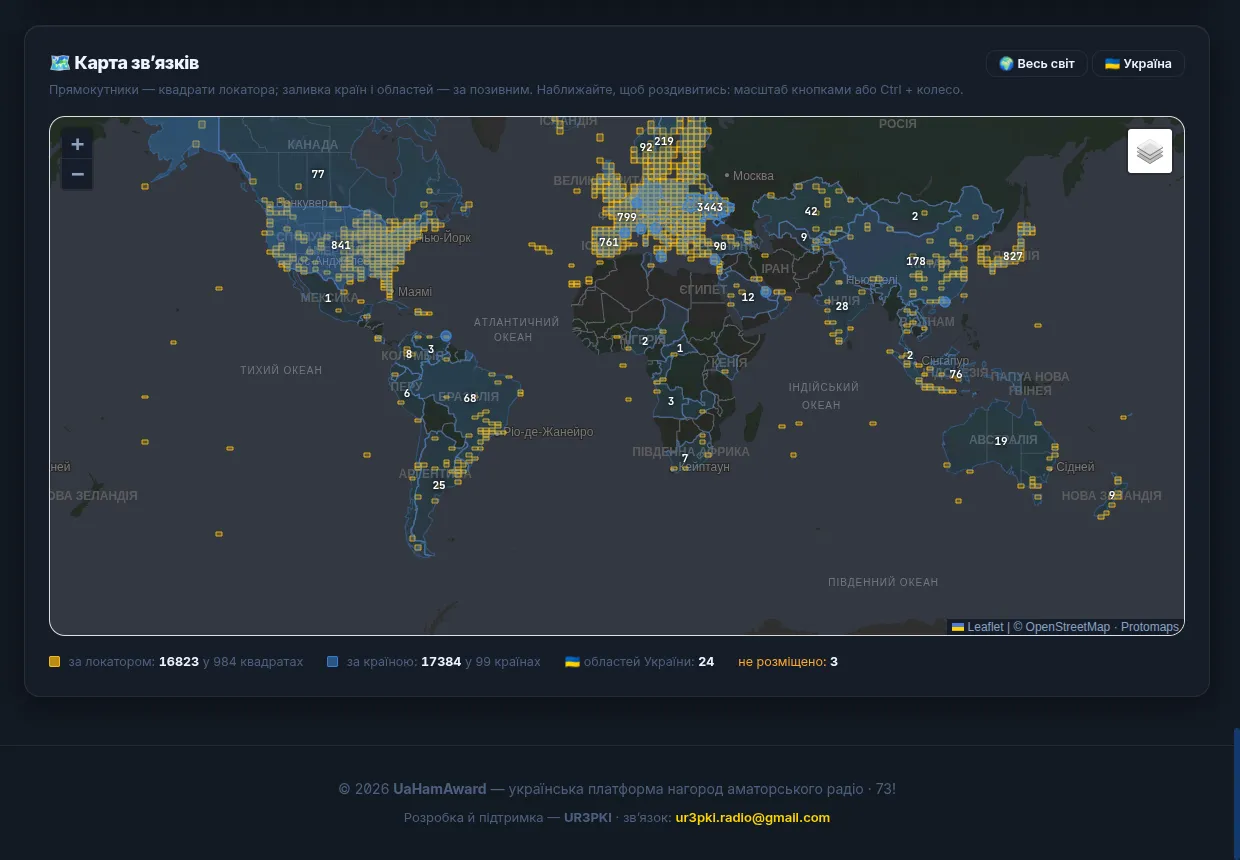
- A contact map: locator squares at their true boundaries, countries by QSO count, and a separate view by Ukrainian oblast.
- The hunter page: your own progress, how much is left to meet the conditions, and which activators are on the air now.
- A live PNG banner listing the active stations — for a QRZ.com page or your own site.
A personal logbook: not only for awards
Every account has its own log, separate from any award: enter contacts by hand or from WSJT-X, upload ADIFs, download them back, switch on automatic syncing with your QRZ logbook. An award is one log and your personal one is another, and they do not mix: a contact made under an event callsign will not land in your own log, nor the other way round.
What the month produced
| Contacts | 17,387 |
| Days on the air | 31 |
| Correspondents | 8,226 |
| DXCC entities (per LoTW) | 124 |
| Activators | 17 callsigns |
| Met the certificate conditions | 62 |
| Through QO-100 | 262 · 1.5 % |
| Locator known | 96.8 % |
| QRZ page views | 100,000+ |
Not one contact was merged by hand. Neither during the month nor after it.
How many people saw it
Since the platform launched on 25 July.
| Page views | 49,388 |
| Visitors | 4,376 |
| Countries | 59 |
| Of whom registered | 123 |
The last line is the most important. 4,376 people used the platform and 123 created an account. That is not a registration failure — it is the design: a hunter does not need an account at all. They open the event page, type in their callsign, see their own progress and collect their certificate. Registration is only needed by someone who goes on the air themselves.
59 countries is no longer about us. Those are people who went looking for what they had been credited with and found a Ukrainian page.
Where this came from
I built the platform myself — from the idea and the architecture through to production, the server and the domain. The first demonstration was on 6 March 2026 from a laptop; the first real event was on 1 August.
| Separate products | 5 |
| Lines of code and documentation | 100,000+ |
| Backend tests | 483 |
| Work by one person | over a year |
I say this not for applause but so it is clear what we are talking about: this is not a page with a table knocked up over a weekend.
What it costs you
Not for organisers, not for activators, not for hunters. The server, the domain and the rest are my concern. If you ever want to support it with a donation that would be welcome, but it changes nothing and unlocks nothing.
I want Ukrainian radio amateurs to have a tool of their own and not to depend on other people's. The rest can wait.
How to start
If you are organising an activity
- Register at uahamaward.com — a minute, an email address and a callsign.
- Write to me and I will set the award up for you. Name, callsign, dates, certificate conditions, artwork. After that you run it yourself.
- Invite activators by callsign. They accept the invitation in their dashboard and can go on the air straight away.
- Operate. The log, the certificates, the QSLs, the statistics and the QRZ upload take care of themselves.
If you are a hunter
No registration at all is needed. The award log is public: type your callsign on the event page and you will see your own progress, how much is left to meet the conditions, and which activators are on the air. The certificate and the QSL download from the same place as soon as the conditions are met.
The platform will run any award — regional, club, national, a single day's activation or a whole month. Write to UR3PKI. I will help you set it up, configure the conditions and get to grips with the bridge, especially the first time.
And something interesting from the data
When a log sits in a database rather than in thirty files, you can learn something from it. I went through August: how the daily volume depends on the solar indices (hardly at all — the calendar rules), while the high bands really do depend on them; why the median distance falls as the flux rises; how far radioteletype reaches and who worked through the geostationary satellite.
→ 17,387 contacts in August: an analysis of the log
73! Petro, UR3PKI